
feature that gives a warning when you press the green flag
-
So chrome gives you a warning if you have progress on a website (like say a drawing or text) and then try to close it
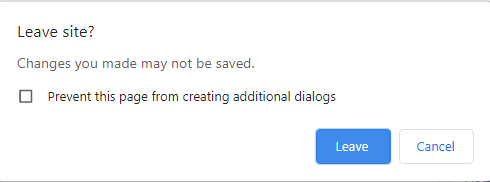
What if Creaticode has a similar feature but for when you try to press the green flag (or also close the tab)? This might be useful so a user doesn’t accidentally reset their progress in a project.For implementing this feature, i’d say a block called “[enable/disable v] tab close warning” and “[enable/disable v] green flag press warning” would do the trick.
Also, I love all the new tutorials and stuff you guys added, I’m actually going to make an AI chatbot project that’s super enhanced using the calculations bot tutorial
#LLJW
<span style="color:white;background-image:linear-gradient(to right, lightblue, navy)">My name is Jeff</span> -
So chrome gives you a warning if you have progress on a website (like say a drawing or text) and then try to close it
What if Creaticode has a similar feature but for when you try to press the green flag (or also close the tab)? This might be useful so a user doesn’t accidentally reset their progress in a project.For implementing this feature, i’d say a block called “[enable/disable v] tab close warning” and “[enable/disable v] green flag press warning” would do the trick.
Also, I love all the new tutorials and stuff you guys added, I’m actually going to make an AI chatbot project that’s super enhanced using the calculations bot tutorial
When you try to close the tab with unsaved work, we already show a warning like that.
For the greenflag, when would it be necessary to show a warning?
-
So chrome gives you a warning if you have progress on a website (like say a drawing or text) and then try to close it
What if Creaticode has a similar feature but for when you try to press the green flag (or also close the tab)? This might be useful so a user doesn’t accidentally reset their progress in a project.For implementing this feature, i’d say a block called “[enable/disable v] tab close warning” and “[enable/disable v] green flag press warning” would do the trick.
Also, I love all the new tutorials and stuff you guys added, I’m actually going to make an AI chatbot project that’s super enhanced using the calculations bot tutorial
@jeffreyrb03-gmail maybe just a block that disables or enables it for when you try to close the tab from the play screen, then it’ll run a new hat block called something like “user tried to leave page” (though I don’t remember if that pop up freezes the page/pauses animation frame requests), then it’ll allow the project to save a user’s data or prepare for them to leave gracefully
<div component="post/signature" data-uid="255" class="post-signature">Check out my chat room project so you ppl can not use forums as chat rooms! https://play.creaticode.com/projects/66f2e1dcd1be43d82b886fbd?version=1 <p dir="auto">
</div> -
@jeffreyrb03-gmail maybe just a block that disables or enables it for when you try to close the tab from the play screen, then it’ll run a new hat block called something like “user tried to leave page” (though I don’t remember if that pop up freezes the page/pauses animation frame requests), then it’ll allow the project to save a user’s data or prepare for them to leave gracefully
That makes sense. So this would be a new hat block in the event category, which will be triggered whenever the user tries to close the tab. We can add this to our todo list. Thanks
-
When you try to close the tab with unsaved work, we already show a warning like that.
For the greenflag, when would it be necessary to show a warning?
@info-creaticode Thats when you see inside and make changes to code, but I mean when playing the project. For example, there could be a drawing application project. But the user might press the green flag and reset all their progress on accident, so this would solve the issue
#LLJW
<span style="color:white;background-image:linear-gradient(to right, lightblue, navy)">My name is Jeff</span> -
@info-creaticode Thats when you see inside and make changes to code, but I mean when playing the project. For example, there could be a drawing application project. But the user might press the green flag and reset all their progress on accident, so this would solve the issue
@jeffreyrb03-gmail that could be fixed with a “first green flag press” hat block, though there would have to be a new button in the editor so you can do a normal green flag press and simulate a “first press” of the flag
<div component="post/signature" data-uid="255" class="post-signature">Check out my chat room project so you ppl can not use forums as chat rooms! https://play.creaticode.com/projects/66f2e1dcd1be43d82b886fbd?version=1 <p dir="auto">
</div> -
@jeffreyrb03-gmail that could be fixed with a “first green flag press” hat block, though there would have to be a new button in the editor so you can do a normal green flag press and simulate a “first press” of the flag
-
We already have this block, which runs when the user clicks the green flag button, but before the “when green flag clicked” block is triggered

@info-creaticode okay, does it run every time you press the green flag in the editor and only once when you press it in the project page?
<div component="post/signature" data-uid="255" class="post-signature">Check out my chat room project so you ppl can not use forums as chat rooms! https://play.creaticode.com/projects/66f2e1dcd1be43d82b886fbd?version=1 <p dir="auto">
</div> -
@info-creaticode okay, does it run every time you press the green flag in the editor and only once when you press it in the project page?
It always runs when the green flag button is clicked.
In this use case, we can use a variable to keep track of if there is any unsaved work from user. This variable will be set to false in the “when green flag clicked” block or when we save the work, and set to true when the user does something new.
Then in the “prepare green flag” block, if this variable is true, then we show the warning.
-
When you try to close the tab with unsaved work, we already show a warning like that.
For the greenflag, when would it be necessary to show a warning?
@info-creaticode I don’t know if that will like stop the user from pressing the green flag and resetting their progress in say, a drawing app. The green flag usually resets things, which is it’s purpose, like resetting widgets and whatnot. However, some method to like give a prompt that says “You have unsaved work in this project, are you sure you want to reset it?” would be good, but i don’t think a hat block would logically make sense for this thing.


Hello! It looks like you're interested in this conversation, but you don't have an account yet.
Getting fed up of having to scroll through the same posts each visit? When you register for an account, you'll always come back to exactly where you were before, and choose to be notified of new replies (either via email, or push notification). You'll also be able to save bookmarks and upvote posts to show your appreciation to other community members.
With your input, this post could be even better 💗
Register Login