
make it so you can drag and drop images into backdrop/sprite editor
-
Right now although it is easier that you can put images saved to your clipboard to upload as a costume, it would also be good for accessibility and convenience if you could drag and drop images you have anywhere else into the Scratch editor where backdrops, sprite costumes, or sprites reside, and it would understand it and add it in.
This is a good example of what I mean:
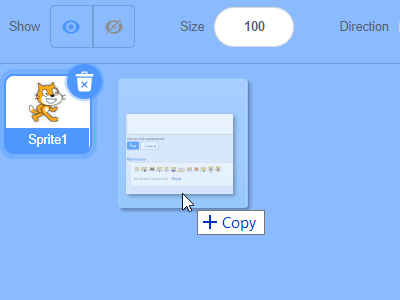
I also wish that you could upload and use .webp images in the CreatiCode editor, since that's pretty common image format you see on the internet (thanks to Google), and it's a bit of a hassle to have to convert it to .png everytime I find a good one to use. Maybe you guys could get away with just converting it automatically (ex:webp -> png) and not having to actually support it?
Is it also possible to allow for alternatively using the default HTML5/browser color picker when selecting color in the costume editor? I mean like `<input type="color"/>` =>#LLJW
<span style="color:white;background-image:linear-gradient(to right, lightblue, navy)">My name is Jeff</span> -
Right now although it is easier that you can put images saved to your clipboard to upload as a costume, it would also be good for accessibility and convenience if you could drag and drop images you have anywhere else into the Scratch editor where backdrops, sprite costumes, or sprites reside, and it would understand it and add it in.
This is a good example of what I mean:
I also wish that you could upload and use .webp images in the CreatiCode editor, since that's pretty common image format you see on the internet (thanks to Google), and it's a bit of a hassle to have to convert it to .png everytime I find a good one to use. Maybe you guys could get away with just converting it automatically (ex:webp -> png) and not having to actually support it?
Is it also possible to allow for alternatively using the default HTML5/browser color picker when selecting color in the costume editor? I mean like `<input type="color"/>` =>Thank you. We can add these to our to-do list.
For the color picker, it would be confusing to have 2 color pickers, right? The existing color picker matches well with how color is presented in Scratch. Any reason you don’t want to use it?
-
Right now although it is easier that you can put images saved to your clipboard to upload as a costume, it would also be good for accessibility and convenience if you could drag and drop images you have anywhere else into the Scratch editor where backdrops, sprite costumes, or sprites reside, and it would understand it and add it in.
This is a good example of what I mean:
I also wish that you could upload and use .webp images in the CreatiCode editor, since that's pretty common image format you see on the internet (thanks to Google), and it's a bit of a hassle to have to convert it to .png everytime I find a good one to use. Maybe you guys could get away with just converting it automatically (ex:webp -> png) and not having to actually support it?
Is it also possible to allow for alternatively using the default HTML5/browser color picker when selecting color in the costume editor? I mean like `<input type="color"/>` =>@jeffreyrb03-gmail
how did you setup a color picker with html XD -
Thank you. We can add these to our to-do list.
For the color picker, it would be confusing to have 2 color pickers, right? The existing color picker matches well with how color is presented in Scratch. Any reason you don’t want to use it?
@info-creaticode
It’s buggy. Sometimes it won’t even register the color you chose, and will go off and not render the costume that’s there. I would show you but again, my school blocked this site, and my phone is not a mouse cursor.
Wait I think I can in vr... cant replicate.Forums Moderator.
Trans girl :3 ~ 14yo
Friendly and sometimes goofy~! -
@info-creaticode
It’s buggy. Sometimes it won’t even register the color you chose, and will go off and not render the costume that’s there. I would show you but again, my school blocked this site, and my phone is not a mouse cursor.
Wait I think I can in vr... cant replicate.@catty
We will need more info on exactly what is the bug, and we can fix it.
-
Thank you. We can add these to our to-do list.
For the color picker, it would be confusing to have 2 color pickers, right? The existing color picker matches well with how color is presented in Scratch. Any reason you don’t want to use it?
@info-creaticode Users would prefer the browser default as it allows for using hex codes and RGB easier because in Scratch, seeing a color from somewhere and then wanting to put it in your project is hard, since it uses a different color system with color, saturation, brightness, and doesn’t easily allow that conversion and makes you do it yourself. I still think the original should be kept but browser html5 one should be alternative as well offered I meant earlier
-
@jeffreyrb03-gmail
how did you setup a color picker with html XD@catty an input tag with type=“color”
-
@info-creaticode Users would prefer the browser default as it allows for using hex codes and RGB easier because in Scratch, seeing a color from somewhere and then wanting to put it in your project is hard, since it uses a different color system with color, saturation, brightness, and doesn’t easily allow that conversion and makes you do it yourself. I still think the original should be kept but browser html5 one should be alternative as well offered I meant earlier
You can paste the image as a costume, then use the color sampler tool at the bottom right to get its exact color values right?

-
You can paste the image as a costume, then use the color sampler tool at the bottom right to get its exact color values right?
@info-creaticode
Yeah but that takes more time than just grabbing the hex code. -
You can paste the image as a costume, then use the color sampler tool at the bottom right to get its exact color values right?
@info-creaticode image pasting doesnt always work for me, in fact I don’t think the clipboard costume paste ever really worked when I tried it on my chromebook. Also what Catty said too, since it’s just for accessibilty and personal preference
#LLJW
<span style="color:white;background-image:linear-gradient(to right, lightblue, navy)">My name is Jeff</span> -
@info-creaticode image pasting doesnt always work for me, in fact I don’t think the clipboard costume paste ever really worked when I tried it on my chromebook. Also what Catty said too, since it’s just for accessibilty and personal preference
So let’s discuss the exact UX design. Suppose we add another color picker doprdown, you want to be able to type in a hex code for a color directly?
-
So let’s discuss the exact UX design. Suppose we add another color picker doprdown, you want to be able to type in a hex code for a color directly?
@info-creaticode Honestly, that’s perfect, and that popup color picker could have like a tab on top to choose your choice of color picker, with it already being on the normal scratch one, and another tab to switch it to being able to put in a hex code directly (with transparency)
#LLJW
<span style="color:white;background-image:linear-gradient(to right, lightblue, navy)">My name is Jeff</span> -
@info-creaticode Honestly, that’s perfect, and that popup color picker could have like a tab on top to choose your choice of color picker, with it already being on the normal scratch one, and another tab to switch it to being able to put in a hex code directly (with transparency)
We will put that on our list. Thank you.

Hello! It looks like you're interested in this conversation, but you don't have an account yet.
Getting fed up of having to scroll through the same posts each visit? When you register for an account, you'll always come back to exactly where you were before, and choose to be notified of new replies (either via email, or push notification). You'll also be able to save bookmarks and upvote posts to show your appreciation to other community members.
With your input, this post could be even better 💗
Register Login