Skip to content
  • Categories
  • Recent
  • Tags
  • Popular
  • Users
  • Groups
  • CreatiCode
Skins
  • Light
  • Brite
  • Cerulean
  • Cosmo
  • Flatly
  • Journal
  • Litera
  • Lumen
  • Lux
  • Materia
  • Minty
  • Morph
  • Pulse
  • Sandstone
  • Simplex
  • Sketchy
  • Spacelab
  • United
  • Yeti
  • Zephyr
  • Dark
  • Cyborg
  • Darkly
  • Quartz
  • Slate
  • Solar
  • Superhero
  • Vapor

  • Default (No Skin)
  • No Skin
Collapse
Brand Logo

CreatiCode Scratch Forum

  1. CreatiCode Forum
  2. Announcements
  3. Dark mode is available now

Dark mode is available now

Scheduled Pinned Locked Moved Announcements
2 Posts 1 Posters 571 Views
  • Oldest to Newest
  • Newest to Oldest
  • Most Votes
Reply
  • Reply as topic
Log in to reply
This topic has been deleted. Only users with topic management privileges can see it.
  • CreatiCodeI Offline
    CreatiCodeI Offline
    CreatiCode
    wrote on last edited by
    #1

    To make our site more accessible, we have added the dark mode. You can turn it on/off this way:

    1. Click on the top right dropdown under your user name, and select “Profile”

    2. In the profile page, scroll down to the settings section, and toggle the “Dark Mode” button:
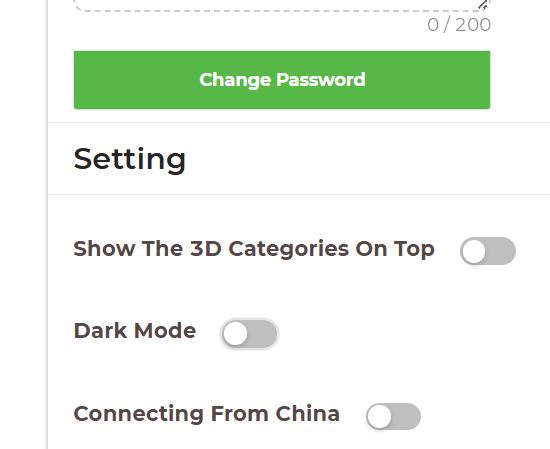
    e4d094a3-6ed5-42ba-995b-0a3bc32f699a-image.png

     
    Here is what it looks like:

    91b5da97-ec1f-4905-9fac-b3f5c040e440-image.png

    2485e83c-2172-404a-841e-4890634e6c1c-image.png

    170b8b73-2433-4c04-9afd-714da5768582-image.png

    152d6f03-9707-4b5b-b0bb-81bdd1cfafb0-image.png

    593c548b-bd78-4a59-837a-154acf94fd48-image.png

    CreatiCodeI 1 Reply Last reply
    0
    • CreatiCodeI CreatiCode

      To make our site more accessible, we have added the dark mode. You can turn it on/off this way:

      1. Click on the top right dropdown under your user name, and select “Profile”

      2. In the profile page, scroll down to the settings section, and toggle the “Dark Mode” button:

      e4d094a3-6ed5-42ba-995b-0a3bc32f699a-image.png

       
      Here is what it looks like:

      91b5da97-ec1f-4905-9fac-b3f5c040e440-image.png

      2485e83c-2172-404a-841e-4890634e6c1c-image.png

      170b8b73-2433-4c04-9afd-714da5768582-image.png

      152d6f03-9707-4b5b-b0bb-81bdd1cfafb0-image.png

      593c548b-bd78-4a59-837a-154acf94fd48-image.png

      CreatiCodeI Offline
      CreatiCodeI Offline
      CreatiCode
      wrote on last edited by
      #2

      Note that you can easily customize both the lite and dark modes in the Profile page now:

      894f8c69-e3aa-4013-b69f-00527d2591f0-image.png

      1 Reply Last reply
      0

      Hello! It looks like you're interested in this conversation, but you don't have an account yet.

      Getting fed up of having to scroll through the same posts each visit? When you register for an account, you'll always come back to exactly where you were before, and choose to be notified of new replies (either via email, or push notification). You'll also be able to save bookmarks and upvote posts to show your appreciation to other community members.

      With your input, this post could be even better 💗

      Register Login
      Reply
      • Reply as topic
      Log in to reply
      • Oldest to Newest
      • Newest to Oldest
      • Most Votes


      • Login

      • Don't have an account? Register

      • Login or register to search.
      • First post
        Last post
      0
      • Categories
      • Recent
      • Tags
      • Popular
      • Users
      • Groups
      • CreatiCode